What are OTA Updates?
OTA Updates are a wireless way for Audar to update your watch with new features, refinements, and UI changes.
When the dashboard notifies you of an update, please follow the instructions below (A video is also available):
Confirm Connection
Swipe left 3 times to the “WWW” face on your watch
Wait for the green tick
Start OTA Update
Swipe left 2 times to the “settings” face on your watch
Swipe down 2 times so you can see “OTAUpdate”
Tap “OTAUpdate” and tap the green tick to confirm
Allow the update to progress
Finalise OTA Update
Once the update is done, the watch will restart
Swipe left 2 times to the “settings” face on your watch
Swipe down 1 time so you can see “Factory Default”
Tap “Reset” and tap the green tick to confirm
What is the “M” on the Home Screen?
The Audar E2 will automatically switch networks between “M” and “N” networks when a stronger signal is found. An “N” means you are connected by NB-IoT while an “M” means you are connected by LTE-M. These networks both allow the watch to function as normal, but some countries will support one type more than the other.
If you find you have no signal after a long journey (For example by train or plane), then you can manually reconnect.
Swipe left 2 limes to the “WWW” face on the watch
Wait for the green tick
Once this has been done you can see the connection strength and the connection type on the home screen.
Please Note: If you still have no connection after following the above process, please contact us and we may be able to identify the interference or outage.
Why Did Fall Detection Not Trigger?
There are a few reasons Fall Detection may not activate when expected:
1) Fall Detection performs a skin contact check and will only trigger if the watch is worn. This is to stop false alarms during storage, or while taking the watch off and putting it down.
2) Fall Detection will be cancelled if decisive movement is made in the moments following a fall. If a user very quickly uses their watch-arm to right themselves and stand, the fall may not be detected for this reason.
3) Fall Detection in E2 is currently calibrated for hard or fast falls from standing height. Slow or slight falls may not be detected.
What if I Change Time Zone?
To change region and time zone for a wearer you must use the online Dashboard. This can be accessed through any browser on any device.
On the Dashboard go to Device Admin
Click on “Edit” under Wearer Info
Here you can select Region, and Time Zone.
Now swipe left 3 times to see the “WWW” watch face and wait for the green tick
The watch will update to the selected time zone on the dashboard
What is “Captain” Status?
You can assign any user to be the “Captain” of a device. This allows the user to access and change settings on the dashboard for that device.
By default, the wearer is the Captain.
If the wearer is unable to use the dashboard or would like to refer control to a relative, carer, etc, then the relative or carer should be assigned as Captain.
Once a Captain is assigned, other users will lose the ability to change settings for that device.
Other users who are added as Caremate can still see health data and device setting, but only the Captain can edit them.
Why is Deviation Report Calendar Not Changing Date?
If you are unable to see deviations from a certain date, please check you are pressing “OK” at the lower right of the calendar box on the Deviations Report page.
If you select a range and then click off of the box, the dates will not change.
Each time you change dates on this page, press “OK” to confirm.
What are Red Dots on the Calendar?
On the Audar Dashboard each vital sign has its own calendar. Days marked with a red dot are simply days for which there is data for that vital sign.
This can show when a watch is not worn for a day.
Why is Battery Draining Faster?
There are three main factors which affect battery discharge:
1) Your measurement frequency is high. You may be performing more than one measurement per vital sign per hour
2) Your device is outside of a network. In rare situations where your watch is outside any network, the battery will discharge faster as the device searches for and connects to new networks
3) Your device is in use abroad. Each watch is optimised to prioritise NB-IoT or LTE-M networks based on the country of origin. While the E2 will function on both of these networks, you may find an increase in battery consumption when in a country which prioritises the other network type.
For Example: A UK E2 will default to LTE-M. Using this device in a country which prioritises NB-IoT, such as Italy, may increase battery use.
What is the Yellow Triangle Warning?
If you see the yellow triangle on the device admin page, you have not inserted a blood pressure calibration amount for that device. This will decrease reliability of blood pressure readings. Please input a blood pressure measurement as taken by a medical cuff.
Pricing Overview
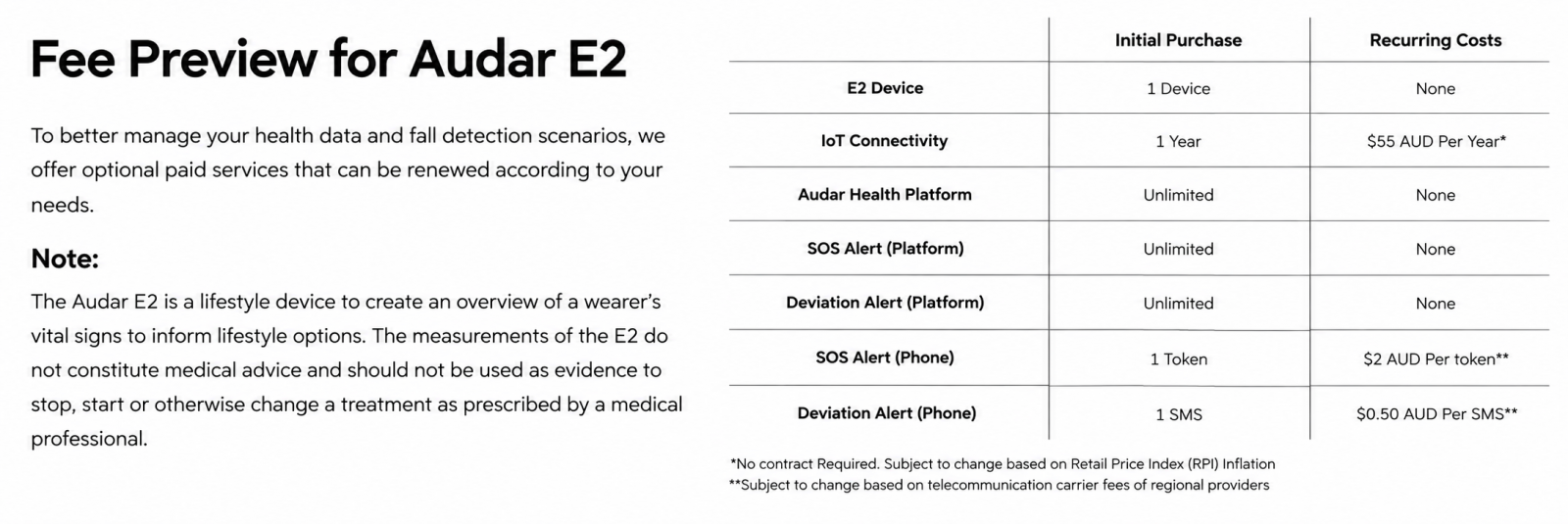
Your first year of telehealth services are included in the product price. Further yearly access to the telehealth platform can be purchased through your AUDAR Health Dashboard for £25 per year. Further SOS SMS / Phone Calls can be purchased in bundles or individually for £1.00 each through your AUDAR Health Dashboard. Please be aware that SOS alert tokens can only be used if you hold an active subscription to facilitate the communication.
AUDAR Health Caremate Dashboard and Communication Services Subscription
The E2 watch uses mobile IoT and internal SIM Card to communicate in moments with carers, patients and your personal AUDAR Telehealth Platform Dashboard. Access to these communication networks is charged annually for £25 per year, and provides access to wireless communication of your data for Caremates as well as facilitating the sending and receipt of SOS Texts and Phone Calls. This charge is to be paid directly through your AUDAR Health Dashboard, and reminders will be sent when your first year is coming to an end. If you choose to not pay for this service, the E2 will display and measure health data locally but access to the international IoT narrow-band network will be unavailable, including sending SOS alerts.
SOS Text and Phone Call Tokens
The E2 watch comes as standard with a year of Telehealth service, and 1 SOS alert tokens. Each SOS token sends out an SMS and a Phone Call to the Primary Caremate phone number you registered on the Dashboard. Tokens are spent one at a time to send both the SMS and Call. Tokens can be bought individually for £1.00 or bundled via your Dashboard.
Deviation Report SMS Messages
The E2 can send deviation report messages to a connected phone number which allows you to immediately see when vital signs stray out of your set range. This feature is completely optional. To set your deviation range please refer to professional medical advice. Please note that deviation reports are available included with the Telehealth Dashboard, but that receiving direct SMS of these reports operates on a credit system, as an optional way to receive deviation data faster than checking your account. Credit can be added via the AUDAR Health Dashboard.
Credit is reduced by 25p per deviation report.
Medical Disclosures
The E2 is currently a lifestyle device. The E2 is not intended for use in detection, diagnosis, treatment, monitoring or management of any medical condition or disease. All data provided is for personal reference for lifestyle changes and does not qualify as prescribed medical advice. If concerned, users should always seek professional medical advice from a physician.
- Temperature and Blood Oxygen sensors are for wellness and lifestyle purposes, not intended for medical use.
- Tracking data on the AUDAR Health Platform should not be used to diagnose a health condition.
- Do not begin a new medication, end current medication or otherwise change your prescribed medical routine based on the information of the E2.
- Users should measure their blood pressure when at rest, as they would do with a traditional cuff, and refrain from measuring when they are working out, smoking, or drinking.
- For accurate blood pressure readings, a calibration is required every 4 weeks by a medical blood pressure monitor & arm cuff.
- Measurements of blood oxygen and blood pressure require the device to be worn sufficiently tight and require the user to remain still while the measurement is taken.
- Heart rate measurements may not be reliable if you have an implanted pacemaker or other implanted medical devices.
- The use of some dyes, such as methylene blue (used in surgery), henna or tattoo ink may affect the absorption of light and the results produced.
- Skin pigmentation may cause overestimates of SpO2 saturation levels so this may need to be considered for such an individual’s readings.
- The radio frequency emitted by the device may interfere with some hearing aids. Seek advice from the manufacturer to determine whether or not the hearing aid will be affected by the radio frequencies emitted.
- Measurements may not be reliable if you are pregnant.
- "Inconclusive" measurements may be retaken manually through the watch.
- Fall detection may trigger during sports and other actions that require both movement and rests frequently (preparing food, putting on a coat, etc). In these cases of false alarm, users can deny the SOS alert through a confirmation screen on the watch.

 AU
AU
 UK
UK DE
DE CA
CA US
US ES
ES FR
FR IT
IT JP
JP CN
CN PL
PL